

Starter
To get started — up to 100 cards in the Quickard design, free forever.
€0
free forever
- Up to 100 business cards
- Standard Quickard design
- Personal link & QR code
- Apple Wallet & Google Wallet
- Contact details editable anytime
- No statistics
For Apple Wallet and Google Wallet
One digital business card with a link, a QR code and a pass for Apple Wallet and Google Wallet. Created in minutes — and updated anytime.
Every card has two parts: the design — how it looks — and the card profile — who it belongs to. You share it via link, QR code and wallet.
Set your logo, colours and contact page once. To get started, the free Quickard design is all you need.
Add name, job title and contact details — for yourself or your whole team, also via CSV import.
Via link, QR code or wallet. People save your details with one tap — no app, no account.
And then? Every change goes live instantly — on the contact page and in the wallet.
Start for freeNew number, new title? You change it once — the contact page and wallet cards follow instantly. Even cards that are already in someone’s wallet.
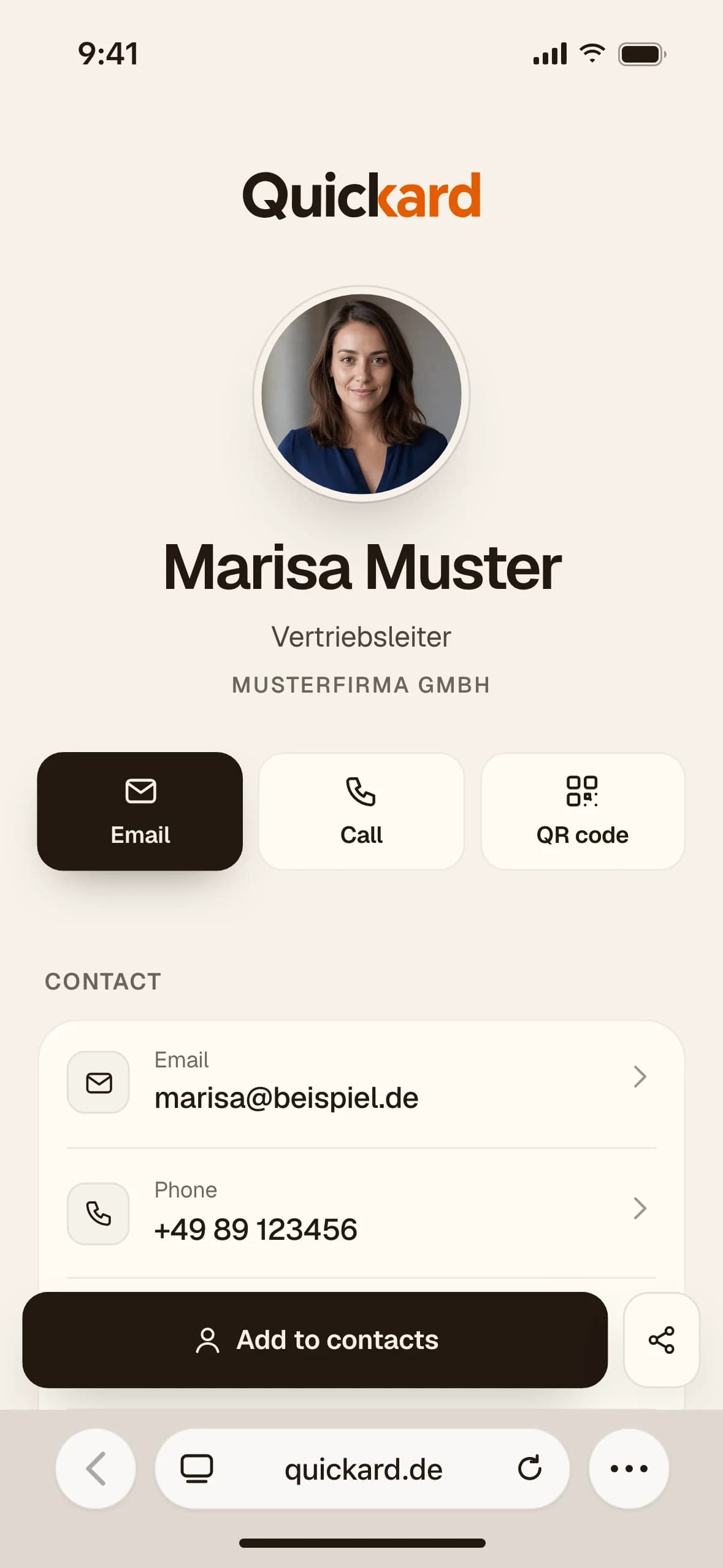
Behind your link is the contact page — the business card you actually share. A template sets the look, blocks bring the content: contact details, social media, offers and more.
Calm and personal — a large photo, fine serifs.
18 templates and 31 blocks — from profile to contact form. Switch anytime, your content stays.
Pro Fully customisable with Pro. Free Starter cards use the standard Quickard page.
Tap a block — the preview jumps to it.
All blocks with sample data from Marisa Muster. You can scroll inside the phone.
RequestsPro
With the contact form on your contact page, messages arrive in one inbox — with an email notification.
Freelancer, team or company: everyone uses the same three steps. Only the scope grows.
Start for free with the Quickard design. With Pro, your card gets your logo and your colours.
Offer, booking link, reviews and social media on one page — all behind one link.
Your card sits in Apple Wallet and Google Wallet — visible offline, with a QR code.
Starter is free forever — with up to 100 cards.
Set the logo, colours and contact page once — every card in the team uses them, and every later change, too.
Import colleagues via CSV, with profile photos if you like.
Whoever manages cards gets their own login with a matching role. The people on the cards don’t need one.
Volume discount from 5 cards — for every card in your plan.
We set up your team individually and send you access by invitation.
Contact pages on your own domain and an exclusive brand template based on your corporate design.
One dedicated contact for setup, questions and extensions.
Pricing and scope on request.
A printed card is finished the moment it’s printed. A Quickard card stays up to date.
| Day to day | Paper cardPrinted, handed out, outdated. | QuickardDigital, shared, up to date. |
|---|---|---|
| Changing details | Reprint and hand out again | Change once, live everywhere instantly |
| Cost of changes | A new print job every time | €0 — no reprints |
| Sharing | Only in person, while stocks last | Via link, QR code and wallet — no limit |
| Saving the contact | Type it in by hand | One tap — straight into the address book |
| Always with you | Only if there are cards left in the case | In your wallet, even offline |
| Statistics | Not measurable | Views and clicks (Pro) |
| Paper and print | Printing, shipping, disposal | No paper needed |
| Start for free |
On infrastructure we run ourselves.
With a data processing agreement for business customers.
Contact pages are deliberately not indexed — link previews still work.
Try it free for 1 month, no payment details — even when you book directly, the first month is free. Then Pro at €5.95 per card per month — less with volume pricing. No hidden fees.
To get started — up to 100 cards in the Quickard design, free forever.
€0
free forever
For professionals and teams — with your own design.
€5.95per card / month · incl. VAT
€5 net for business customers
With volume discount from €4.17 per card per month (from 50 cards)
€5.65 per card€28.26 / month for 5 cards · incl. VAT€23.75 net for business customers
The volume discount applies to every card in your plan.
For companies with their own presence and many cards.
On request
Individual offer
Gross prices include 19% German VAT. The VAT actually due depends on your country and is calculated bindingly at checkout.
Right of withdrawal for consumers · Cancel contract
What people ask us most often. Anything else? Write to us — we usually reply within one business day.
kontakt@quickard.deNo. You share your business card via link or QR code — the other person needs neither an app nor an account. Quickard itself runs in the browser, and you add your own card to Apple Wallet or Google Wallet with one tap.
Your contact page under a personal link — with a QR code and a contact download. The same card is also available as a wallet card in Apple Wallet or Google Wallet.
Via link, via QR code or straight from your wallet. The other person saves your details with one tap — no Quickard account needed. Sharing is unlimited in every plan.
Yes, anytime and in every plan. Changes to your contact details appear on your contact page instantly and are pushed to wallet cards — even ones that are already in a wallet. With Pro, the same goes for the design and the contact page.
Apple Wallet and Google Wallet — every card is available for both. The wallet card carries a QR code that leads to your contact page and is visible offline, too.
Yes. With Pro you set the logo, colours and contact page yourself. In a team, all cards share one design. Apple Wallet uses all three colours, Google Wallet uses the background colour.
No. Only those who manage cards need a Quickard login. You simply create the people on the cards — the card profiles — also via CSV import.
Yes, for one month with up to 10 cards in your own design and no payment details. The trial ends on its own and does not renew. If you book Pro during the trial, you only pay from its end and your cards move to the booked seats; without Pro they continue afterwards as free Starter cards in the Quickard design — with the same link and QR code. Booking Pro directly also gets you the first month free. You can start it at the end of the setup or later in the app.
Monthly plans can be cancelled at the end of the current month, annual plans at the end of the paid year. Everything keeps running until then; after that, nothing renews — your cards then continue as free Starter cards in the Quickard design. You can do this in the app or without logging in at quickard.de/en/cancel-contract.
Developed and hosted in Germany. We process data in line with the GDPR — and you decide which details appear on your card. Business customers get a data processing agreement.
Yes. For Enterprise we set up your team individually and send you access by invitation — with your own domain and an exclusive brand template if you like. Write to kontakt@quickard.de.
Let’s go
Start for free and share in minutes. Upgrade when you need more.